Networks & Wi-Fi.
Soundwaves designs, installs, and manages the wired networks and Wi-Fi that homes and businesses run on. See who’s at the gate and open it to let them in. Stream a film from your personal media server, whether you’re in the living room or miles from home. From the same app, you can dim the lights, lower the motorized shades, choose the music, arm the alarms, and adjust heating and cooling across multiple buildings.
We can model coverage in 3D, plan the wiring and wireless access points, and test the connection where you use it, from the desk upstairs to the last table on a busy restaurant patio.
Built for the
busiest day.
A home office above a garage and a restaurant patio full of guests ask very different things of a network. We start where you work, gather, and spend time.
Where the signal reaches
A speed test in the kitchen can look great while calls freeze in the upstairs office. Testing at your desk helps us trace the issue to the internet service, the wiring, or the Wi-Fi in that room.
How much it can handle
Consider a busy dinner service. Guests are on their phones while servers are sending orders from the same patio. We size the connection and the wireless equipment around the number of people and devices using them at once.
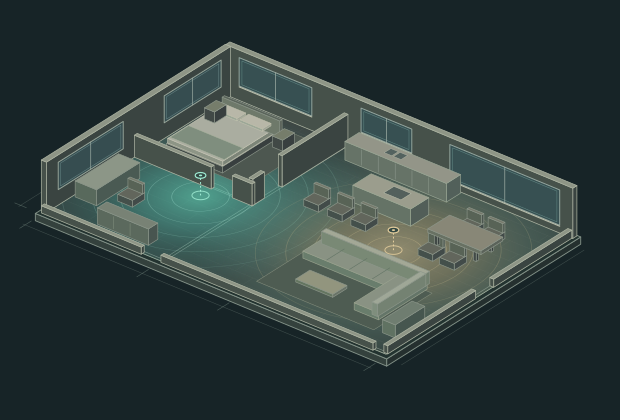
See the coverage before the first cable is run.
For an existing property, we can walk the rooms and capture a three-dimensional model. For new construction, we can start with your architect’s plans. We compare equipment and placement, accounting for how walls, floors, brick, and stone affect the signal.
Prefer to keep a paneled ceiling clear? An in-wall access point can leave just a discreet faceplate in view. If you’d like the equipment completely out of sight, we can model a concealed location or an adjacent room, then test coverage at your desk or out on the terrace.
How it all
connects.
From the wiring behind the walls to the backup connection that keeps a business online, each part has a job.
Wiring the equipment that stays put
A fixed camera can send video to its recorder over Ethernet, and a television can stream over a wired connection. That leaves more wireless capacity for the devices moving around the property. Wherever practical, we also wire each access point directly back to the network.
Wi-Fi from room to room
Where an access point goes matters as much as how many you install. We account for the building materials and nearby Wi-Fi, adjust how neighboring access points share the airwaves, and test the transitions you actually make, like walking from your office onto the patio during a call.
Linking buildings and planning for growth
A garage, guest house, or workshop can share the main building’s network. Distance, terrain, and available pathways help us choose between a fiber run and a dedicated point-to-point wireless link. If a driveway is being redone or a trench is already open, that’s the time to plan for a future building.
Guest access and private systems
Visitors can get online while cameras, private computers, and automation controls stay on separate parts of the network. We also plan which devices should communicate, so your phone can still find the speakers when you want music outside. For businesses, we can separate guest traffic from point-of-sale and staff systems.
Automatic backup internet
If your home office or business depends on staying online, we can configure an automatic switch to an available second provider, Starlink, or cellular service. A call may need to reconnect during a changeover. When power outages are a concern, we also plan backup power for the equipment that needs to stay running.
Cable testing and certification
We label the cabling, document where each run goes, and organize the equipment for service. When a project calls for certification, we use Fluke Versiv equipment and provide measured results tied to each tested run.
Remote monitoring and ongoing support
When a camera or speaker drops offline, several components could be involved. With remote monitoring in place, we can often narrow down whether a device, an access point, or the internet service needs attention before we make a visit.
One estate.
One network. One app.
From an 1885 main house to music at a beach, see how a managed network connects multiple dwellings, the grounds, and the waterfront.
Explore the estate project- Wireless access points
- 40+
- Main house to beach
- 800 ft